2024年8月

核心问题 由于一个处理的不是骑缝章 ModifyRidingSeamStampWidth和ModifyRidingSeamStampHeight 为0

 // 将骑缝章的cm尺寸转化为px
            (double widthPx, double heightPx) = ImageUtilities.CentimetersToPixels(RidingSeamStampWidth, RidingSeamStampHeight, RidingSeamStampDpiX, RidingSeamStampDpiY);

            // 调整图片大小、透明度
            BitmapSource modifyImage = ImageUtilities.ModifyImage(RidingSeamStampFilePath, widthPx, heightPx, RidingSeamStampTransparency);

            // 将骑缝章的像素尺寸转化为point
            (double widthPt, double heightPt) = ImageUtilities.PixelsToPoints(modifyImage.PixelWidth, modifyImage.PixelHeight, RidingSeamStampDpiX, RidingSeamStampDpiY);

            // 调整骑缝章尺寸
            modifyImage = ImageUtilities.ResizeBitmapSource(modifyImage, widthPt, heightPt);

            // 获取调整后骑缝章图片的宽度和高度
            ModifyRidingSeamStampWidth = widthPt;
            ModifyRidingSeamStampHeight = heightPt;
// 调整图片大小
img.ScaleAbsolute((float)ModifyRidingSeamStampWidth, (float)ModifyRidingSeamStampHeight);

<CheckBox Width="90" Content="比例缩放" VerticalAlignment="Center" VerticalContentAlignment="Center" IsChecked="{Binding IsProportional}" Cursor="Hand" Padding="0 0 0 0">
                                <CheckBox.Style>
                                    <Style TargetType="CheckBox">
                                        <Style.Triggers>
                                            <DataTrigger Binding="{Binding StampFilePath}" Value="{x:Null}">
                                                <Setter Property="IsEnabled" Value="False"/>
                                            </DataTrigger>
                                            <DataTrigger Binding="{Binding StampFilePath}" Value="">
                                                <Setter Property="IsEnabled" Value="False"/>
                                            </DataTrigger>
                                        </Style.Triggers>
                                    </Style>
                                </CheckBox.Style>
                            </CheckBox>

如果非圆形图像,旋转的时候需要计算旋转后的画布尺寸,不然的话会导致旋转后显示的图像不全,最后将将图像绘制在新的中心位置。

// 修改图片大小、旋转角度、透明度 (印章)(预览)
        public static BitmapSource ModifyImage(string imagePath, double newWidth, double newHeight, double rotationAngle, double stampTransparency)
        {
            // 加载图像
            BitmapImage bitmap = new BitmapImage(new Uri(imagePath));

            // 调整图像尺寸
            TransformedBitmap resizedBitmap = new TransformedBitmap(bitmap, new ScaleTransform(newWidth / bitmap.PixelWidth, newHeight / bitmap.PixelHeight));

            // 计算旋转后的画布尺寸
            double radians = rotationAngle * Math.PI / 180;
            double sin = Math.Abs(Math.Sin(radians));
            double cos = Math.Abs(Math.Cos(radians));

            double rotatedWidth = resizedBitmap.PixelWidth * cos + resizedBitmap.PixelHeight * sin;
            double rotatedHeight = resizedBitmap.PixelWidth * sin + resizedBitmap.PixelHeight * cos;

            // 创建一个新的 DrawingVisual
            DrawingVisual drawingVisual = new DrawingVisual();
            using (DrawingContext drawingContext = drawingVisual.RenderOpen())
            {
                // 计算新的中心点
                double centerX = rotatedWidth / 2;
                double centerY = rotatedHeight / 2;

                // 创建旋转变换
                RotateTransform rotateTransform = new RotateTransform(rotationAngle, centerX, centerY);

                // 设置透明度
                drawingContext.PushOpacity(stampTransparency);

                // 应用旋转并绘制图像
                drawingContext.PushTransform(rotateTransform);

                // 将图像绘制在新的中心位置
                drawingContext.DrawImage(resizedBitmap, new Rect((rotatedWidth - resizedBitmap.PixelWidth) / 2, (rotatedHeight - resizedBitmap.PixelHeight) / 2, resizedBitmap.PixelWidth, resizedBitmap.PixelHeight));

                // 弹出变换和透明度设置
                drawingContext.Pop();
                drawingContext.Pop();
            }

            // 将Visual渲染为BitmapSource,使用旋转后的画布尺寸
            RenderTargetBitmap renderTargetBitmap = new RenderTargetBitmap((int)Math.Ceiling(rotatedWidth), (int)Math.Ceiling(rotatedHeight), bitmap.DpiX, bitmap.DpiY, PixelFormats.Pbgra32);
            renderTargetBitmap.Render(drawingVisual);

            return renderTargetBitmap;
        }

        // 修改图片旋转角度、透明度(印章)(PDF)
        public static BitmapSource ModifyImage(string imagePath, double rotationAngle, double stampTransparency)
        {
            // 加载图像
            BitmapImage bitmap = new BitmapImage(new Uri(imagePath));

            // 计算旋转后的画布尺寸
            double radians = rotationAngle * Math.PI / 180;
            double sin = Math.Abs(Math.Sin(radians));
            double cos = Math.Abs(Math.Cos(radians));

            double newWidth = bitmap.PixelWidth * cos + bitmap.PixelHeight * sin;
            double newHeight = bitmap.PixelWidth * sin + bitmap.PixelHeight * cos;

            // 创建一个新的 DrawingVisual
            DrawingVisual drawingVisual = new DrawingVisual();
            using (DrawingContext drawingContext = drawingVisual.RenderOpen())
            {
                // 计算新的中心点
                double centerX = newWidth / 2;
                double centerY = newHeight / 2;

                // 创建旋转变换
                RotateTransform rotateTransform = new RotateTransform(rotationAngle, centerX, centerY);

                // 设置透明度
                drawingContext.PushOpacity(stampTransparency);

                // 应用旋转并绘制图像
                drawingContext.PushTransform(rotateTransform);

                // 将图像绘制在新的中心位置
                drawingContext.DrawImage(bitmap, new Rect((newWidth - bitmap.PixelWidth) / 2, (newHeight - bitmap.PixelHeight) / 2, bitmap.PixelWidth, bitmap.PixelHeight));

                // 弹出变换和透明度设置
                drawingContext.Pop();
                drawingContext.Pop();
            }

            // 将Visual渲染为BitmapSource
            RenderTargetBitmap renderTargetBitmap = new RenderTargetBitmap((int)Math.Ceiling(newWidth), (int)Math.Ceiling(newHeight), bitmap.DpiX, bitmap.DpiY, PixelFormats.Pbgra32);
            renderTargetBitmap.Render(drawingVisual);

            return renderTargetBitmap;
        }

1.使用 TransformedBitmap 类(System.Windows.Media.Imaging)可以对图片进行缩放操作。

var originalBitmap = new BitmapImage(new Uri("yourImagePath"));

// 缩放图片
var scaleTransform = new ScaleTransform(0.5, 0.5); // 缩放比例:50%
var scaledBitmap = new TransformedBitmap(originalBitmap, scaleTransform);

// 旋转图片
var rotateTransform = new RotateTransform(45); // 旋转45度
var transformedBitmap = new TransformedBitmap(scaledBitmap, rotateTransform);

// 设置图片源
imageControl.Source = transformedBitmap;

// 设置透明度
imageControl.Opacity = 0.5; // 透明度设置为50%

2.System.Drawing (GDI+)

public static Bitmap ModifyImage(string imagePath, double newWidth, double newHeight, double rotationAngle, double stampTransparency, bool isCircle)
{
    // 加载图像
    Bitmap image = new Bitmap(imagePath);

    // 修改图像大小
    Bitmap resizedImage = new Bitmap((int)Math.Round(newWidth), (int)Math.Round(newHeight));

    using (Graphics g = Graphics.FromImage(resizedImage))
    {
        // 设置高质量插值法和抗锯齿模式
        g.InterpolationMode = InterpolationMode.HighQualityBicubic;
        g.SmoothingMode = SmoothingMode.AntiAlias;
        g.PixelOffsetMode = PixelOffsetMode.HighQuality;

        // 绘制缩放后的图像
        g.DrawImage(image, 0, 0, resizedImage.Width, resizedImage.Height);
    }

    Bitmap finalImage;

    // 仅保留圆形处理的代码
    if (isCircle)
    {
        finalImage = new Bitmap(resizedImage.Width, resizedImage.Height, PixelFormat.Format32bppArgb);

        using (Graphics g = Graphics.FromImage(finalImage))
        {
            // 清除背景(透明)
            g.Clear(Color.Transparent);

            // 设置旋转中心为图像的中心
            g.TranslateTransform((float)resizedImage.Width / 2, (float)resizedImage.Height / 2);

            // 旋转图像
            g.RotateTransform((float)-rotationAngle);

            // 重置变换矩阵回原点
            g.TranslateTransform(-(float)resizedImage.Width / 2, -(float)resizedImage.Height / 2);

            // 绘制图像
            g.DrawImage(resizedImage, new Point(0, 0));
        }
    }

    // 设置透明度
    if (stampTransparency >= 0)
    {
        // 创建一个新的位图,用于保存透明度应用后的图像
        Bitmap transparentImage = new Bitmap(finalImage.Width, finalImage.Height, PixelFormat.Format32bppArgb);

        using (Graphics g = Graphics.FromImage(transparentImage))
        {
            // 使用颜色矩阵应用透明度
            ColorMatrix colorMatrix = new ColorMatrix
            {
                Matrix33 = (float)(stampTransparency / 100.0f) // 设置Alpha值
            };
            ImageAttributes attributes = new ImageAttributes();
            attributes.SetColorMatrix(colorMatrix, ColorMatrixFlag.Default, ColorAdjustType.Bitmap);

            // 绘制图像,并应用透明度
            g.DrawImage(finalImage, new Rectangle(0, 0, finalImage.Width, finalImage.Height),
                        0, 0, finalImage.Width, finalImage.Height, GraphicsUnit.Pixel, attributes);
        }

        finalImage.Dispose(); // 释放旧的图像资源
        finalImage = transparentImage; // 用透明度应用后的图像替换
    }

    return finalImage;
}
样式:2024年08月06日 19:31:48

ffmpeg -i C:\Users\az102\Desktop\input.mp4 -vf "drawtext=fontfile='C\:/Windows/Fonts/simsun.ttc':text='%{pts\:localtime\:1722943908\:%Y年%m月%d日 %H\\\:%M\\\:%S}':x=100:y=100:fontsize=24:fontcolor=white:box=1:boxcolor=0x00000000" -codec:a copy C:\Users\az102\Desktop\output.mp4

样式:2024\12\19 08:40:05

ffmpeg -i C:\Users\az102\Desktop\input.mp4 -vf "drawtext=fontfile='C\:/Windows/Fonts/msyh.ttc':text='%{pts\:localtime\:1734568805\:%Y\\\\%m\\\\%d %H\\\:%M\\\:%S}':x=100:y=100:fontsize=19:fontcolor=white:box=1:boxcolor=0x00000000" -codec:a copy C:\Users\az102\Desktop\output.mp4

样式:2024/12/19 08:40:05

ffmpeg -i C:\Users\az102\Desktop\input.mp4 -vf "drawtext=fontfile='C\:/Windows/Fonts/msyhbd.ttc':text='%{pts\:localtime\:1734568805\:%Y/%m/%d %H\\\:%M\\\:%S}':x=100:y=100:fontsize=19:fontcolor=white:box=1:boxcolor=0x00000000" -codec:a copy C:\Users\az102\Desktop\output.mp4

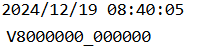
样式:样式.png

ffmpeg -i C:\Users\az102\Desktop\video\input.mp4 -vf "drawtext=fontfile='C\:/Windows/Fonts/ARIALBD.TTF':text='%{pts\:localtime\:1734568805\:%Y/%m/%d %H\\\:%M\\\:%S}':x=100:y=100:fontsize=20.5:fontcolor=white:box=1:boxcolor=0x00000000, drawtext=fontfile='C\:/Windows/Fonts/ARIALBD.TTF':text='V800000_000000':x=100:y=125:fontsize=20.5:fontcolor=white:box=1:boxcolor=0x00000000" -codec:a copy C:\Users\az102\Desktop\output.mp4